2014-03-04
Step 1: buy a lot of DS18x20 temperatur sensors
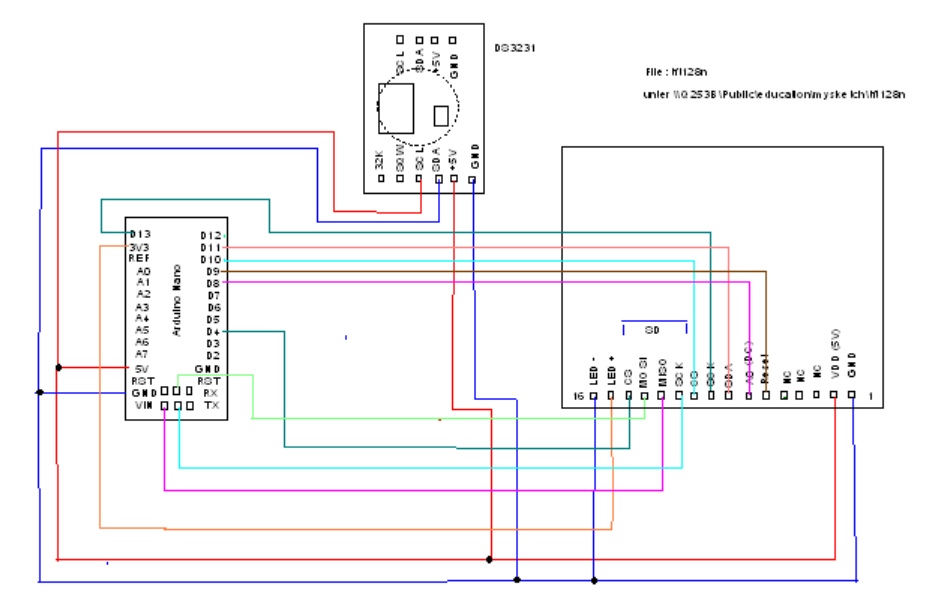
// c001

/*  ***************************************
 * letzte Ändeung 08.10.14; SCL 29.06.21, 02.07.21
 Funktionen
 1.  TFT mit 16 Pin Ansteuerung
 2. SD-Karte lesen und schreiben  ok
 3. RTC Zeit setzen und auslesen   https://wolles-elektronikkiste.de/ds3231-echtzeituhr
 4 Taster für Funktionen auslesen


 * Testaufbau
 * mit Arduino UNO  Ausgabe an TFT 1,8 Zoll Display 128 x 160 neu
 * Grundlage ist das Testprogramm  spitftbitmap von
 * Limor Fried/Ladyada  Written for Adafruit Industries.

 ************

 *******************************************  */
// #include
// #include
#include     // Core graphics library
#include  // Hardware-specific library
#include
#include
//#include  // Einbinden der OneWire Library
#include "RTClib.h"  // RTC-Bibliothek einbinden


/*
TFT Pin                    Arduino Nano
1    GND                       GND
2    VCC +5V                   +5V
3    NC (not connected)
4    NC
5    NC
6  s  Reset                     8
7  gr  A0                       9
8  s   SDA                      4
9  ge  SCK  (SCL)               11
10 b  CS                        7
11 gege  SCK SD   + TFT 9(SCK)  13             7
12 w  MISO SD                   12
13 ss  MOSI SD  + TFT 8(SDA)    11
14 ge  CS  SD                   4
15 ge  LED +                    über 330 Ohm an +5V
16 b  LED -                     GND
*/

// TFT display and SD card will share the hardware SPI interface.
// (Serial Peripheral Interface)
// Hardware SPI pins are specific to the Arduino board type and
// cannot be remapped to alternate pins.  For Arduino
// Uno, Duemilanove, etc.,
// pin 11 = SD-MOSI(13)+ TFT-SDA (8)  (ICSP-4 (mega2560))
// pin 12 = SD-MISO	                  (ICSP-1 (mega2560))
// pin 13 = SD-SCLK + TFT-SCL         (ICSP-3 (mega2560))
// pin 20 = SDA für RTC  (mega2560) (SDA UNO NANO = Pin A4)
// pin 21 = SCL für RTC  (mega2560) (SCL UNO NANO = Pin A5)

#define SD_CS    4  // Chip select line for SD card
#define TFT_CS  10  // Chip select line for TFT display
#define TFT_DC   8  // Data/command line for TFT
#define TFT_RST  9  // Reset line for TFT (or connect to +5V)
//#define DS1307_I2C_ADDRESS 0x68  // the I2C address of Tiny RTC

#define RTC_I2C_ADDRESS 0x68 // I2C Adresse des RTC  DS3231
RTC_DS3231 rtc;

// Option 1 (recommended): must use the hardware SPI pins
// (for UNO thats sclk = 13 and sid = 11) and pin 10 must be
// an output. This is much faster - also required if you want
// to use the microSD card (see the image drawing example)
 Adafruit_ST7735 tft = Adafruit_ST7735(TFT_CS, TFT_DC, TFT_RST);  //uno

// Option 2: use any pins but a little slower!
//uno-nano
//#define TFT_SCLK 13   // set these to be whatever pins you like!
//#define TFT_MOSI 11   // = TFT Punkt 8 = SDA  set these to be whatever pins you like!
//mega
//#define TFT_SCLK 20   // set these to be whatever pins you like!
//#define TFT_MOSI 21   // = TFT Punkt 8 = SDA  set these to be whatever pins you like!
//Adafruit_ST7735 tft = Adafruit_ST7735(TFT_CS, TFT_DC, TFT_MOSI, TFT_SCLK, TFT_RST);  //mega??

#define b_plus 6   // schalter für plus
#define b_minus 3   // schalter für minus


//Declaration + Pinbelegung
//Farben bei Greentab
 const uint16_t  Blue    = 0xF800;
 const uint16_t  Red     = 0x001F;
 const uint16_t  Green   = 0x07E0;
 const uint16_t  Cyan    = 0xFFE0;
 const uint16_t  Magenta = 0xF81F;
 const uint16_t  Yellow  = 0x07FF;
 const uint16_t  White   = 0xFFFF;
 const uint16_t  Black   = 0x0000;
// Bei REDTAB Rot und Blau sowie Gelb und Cyan vertauscht


File myFile;
long w_dog;

char myrel[] ="TFT128n Build 0.03  ";
char txt5[] = "Kartenfehler: halt";
char txt6[] = "pruefen danach Reset";

int taste_plus = 1;
int g_mode = 0;  //global mode
boolean tore = false;  // Recording Zeit oder Ereignis  ausgelöst

int c_minute = 0;
//int t_d[6] ={11,1,1,17,1,2013}; //zeit eeprom ab 32
File dataFile;

bool timelost = 0;
char buf3[18] = "DD.MM.YYYY  hh:mm";
char daysOfTheWeek[7][12] = {"Sonntag", "Montag", "Dienstag ", "Mittwoch", "Donnerstag", "Freitag", "Samstag"};
//+++++++++++++++++++++

// We'll use this variable to store a found device address
// Array of 8 uint8_t
byte modus = 0; // modus


//-------------  setup  -----------------------

  Serial.begin(9600);
/*
#ifndef ESP8266
  while (!Serial); // wait for serial port to connect. Needed for native USB
#endif
*/
  if (! rtc.begin()) {
    Serial.println("RTC nicht bereit");
    Serial.flush();
    // abort();
  } else Serial.println("RTC gestartet");

 //Wire.begin();

  // On the Ethernet Shield, CS is pin 4. Note that even if it's not
  // used as the CS pin, the hardware CS pin (10 on most Arduino boards,
  // 53 on the Mega) must be left as an output or the SD library
  // functions will not work.
  pinMode(10, OUTPUT); //??
  pinMode(13, OUTPUT); //
  pinMode(b_plus,INPUT);
  pinMode(b_minus,INPUT);
  digitalWrite(13, LOW); //nur um LED auszuschalten

  //tft.initR(INITR_REDTAB);   // initialize a ST7735R chip, red tab(an der Schutzfolie)
  tft.initR(INITR_BLACKTAB);
  // tft.initR(INITR_GREENTAB); // initialize a ST7735R chip, green tab

  // ++++++++++++
  //nur einmal für RTC setzen dann auskommentieren
// Zeit einlesen
//  rtc.adjust(DateTime(2021, 7, 3, 16, 50, 0));
// oder
    // folgende Zeile setzt die Zeit der compilierung des sketches.
 //rtc.adjust(DateTime(F(__DATE__), F(__TIME__)));
 //timelost = 0;
  // +++++++++++

  if (rtc.lostPower()) {
    timelost = 1;
  }

  tft.fillScreen(0x0000);  //ST7735_BLACK

  Serial.print("Initialisierung SD card...");

   if (startSDCard() != true) { //keine SD Karte gefunden
    tft.println(txt5);
    tft.println(txt6);
    //while(1);
  } else  Serial.println("Initialisierung SD card erfolgreich.");
    sd_write("Start","  V 0.3");
/*
  if (!SD.begin(4)) {
    Serial.println("initialization failed!");
    while (1);
  }
  */
   tft.setTextColor(White,Blue);  // white
   clockDisplay(6,22,3,1);
   tft.setTextColor(Yellow);  // white
  tft.setCursor(0, 150);
  tft.print(myrel);

  /*
  if(timeStatus()== timeNotSet) {
   // Serial.print(txt7);   // Fehler Zeiteinstellung
  }
*/
  // Kopf-Ausgabe auf Bildschirm
  tft.setCursor(8,0);
  tft.setTextColor(Green);
  tft.println("TFT, RTC SD-Card");
  tft.setCursor(12,10);
  tft.println("Testprogramm t001");
  tft.setTextColor(White,Blue);
}
//+++++++++++++++++++++++++++++++++++++++ end setup  +++++++++++++++++++++++++++++++
void loop(){
    DateTime now = rtc.now();
    if (c_minute != now.minute()){
      c_minute = now.minute();
      char tbuf[] = " DD.MM.YYYY  hh:mm ";
      Serial.println(now.toString(tbuf));
      clockDisplay(6,22,3,1);   // xpos,ypos mode, size
  }

}  // ++++++++++++++++++++++++++++++++    ende loop   ++++++++++++++++++++++++++++

boolean startSDCard() {
  boolean result = false;
  // see if the card is present and can be initialized:
  if (!SD.begin(SD_CS)) {
    // don't do anything more:
    result = false;
  }
  else {
     DateTime now = rtc.now();
    // File dataFile = SD.open("tempc.log", FILE_WRITE);
    dataFile = SD.open("tempc.log", FILE_WRITE);
    if (dataFile) {
      dataFile.println("Zeitstempel");
      dataFile.print(now.day());
      dataFile.print(".");
      dataFile.print(now.month());
      dataFile.print(".");
      dataFile.println(now.year());
      dataFile.close();
      result = true;
    }
  }
  return result;
}
//------------------------------

//------------------------------
void sd_read(){
  int lvta1,lvta2 = 0;
  dataFile = SD.open("tempc.log", FILE_READ);
  if (dataFile) {
    int lc = 0;
    int lc2 = 0;
    uint8_t mb[100];
    int r_d = 1;
    boolean l_loop = true;

    dataFile.seek(0); // Daten aus  File lesen
    int  anzb = dataFile.available();
    while (l_loop) {
      while ((anzb > 0) && (r_d == 1)){
        mb[lc] = dataFile.read();
        //Serial.println(mb[lc]);
        if (mb[lc] == 0x0D){   // Zeilenende erreicht
          tft.fillRect(0,90,127,8, 0x0000);
          tft.setCursor(0,90);
          for (int i = 0; i <= lc;i++) if (mb[i] >= 0x21) tft.write(mb[i]);
          r_d = 0;
        }
        lc++;
        anzb--;
        if (lc >= 99) lc = 0;  // Buffer ist nur 100 Byte)
      }  //Zeile ausgegeben
      lc  = 0;   //lc vorbereiten für nächste Zeile
      lvta2 = digitalRead(b_plus);  // falls plus taste gedrückt
      if (lvta2 == LOW){
        delay(300);
        w_dog = millis();
        r_d = 1; //nächste Zeile lesen
      }
      lvta1 = digitalRead(b_minus);  // falls minus taste gedrückt
      if (lvta1 == LOW){
        delay(300);
        w_dog = millis();
        l_loop = false;  //lesen beenden
      }
      delay(100);
      if ((millis() - w_dog) > 20000){
        l_loop = false;  //lesen beenden da kein Tastendruck registriert
        g_mode = 0;
      }
      //w_dog
    }  //end while
    dataFile.close();
  }  // if dataFile
  else {
    // if the file didn't open, print an error:
    tft.setCursor(0,90);
    tft.print("Datei-Fehler");
    return;
  }
} // end sd read

// ---------------------------------
void sd_write(char* ltx1,char* ltx2){
  File dataFile = SD.open("tempc.log", FILE_WRITE);
  if (dataFile) {
    dataFile.print(ltx1);
    dataFile.println(ltx2);
    DateTime now = rtc.now();
    if (now.hour() < 10) dataFile.print("0");
    dataFile.print(now.hour());
    dataFile.print(":");
    if (now.minute() < 10) dataFile.print("0");
    dataFile.println(now.minute());
    dataFile.close();
  }
}
//--------------------------------
void tft_vorNull(byte wert)
{
  if (wert < 10) tft.print("0");
}

//Mehr Infos: https://arduino-projekte.webnode.at/meine-libraries/rtc-ds3231/

void clockDisplay(int xpos, int ypos, int d_mode, int c_size){
  tft.fillRect(0,ypos , (127 - xpos),(8 * c_size) ,Blue);

  tft.setTextSize(c_size);
  tft.setCursor(xpos,ypos);
  if(timelost){
    tft.print(" RTC Zeit verloren");
    return;
  }

  if (d_mode > 0 ){
    DateTime now = rtc.now();
    char tbuf[] = " DD.MM.YYYY  hh:mm ";
    tft.print(now.toString(tbuf));

  }
}

//-------------------------------
byte decToBcd(byte val){
  return ( (val/10*16) + (val%10) );
}
// Convert binary coded decimal to normal decimal numbers
byte bcdToDec(byte val){
  return ( (val/16*10) + (val%16) );
}
//------------------------------